
Feature
Workflow Automation for Customer Chats
Build automations on a visual canvas: answer keywords, ask questions, call other systems and follow up after a chat is closed. No code needed.
This feature is on the Full plans, not on Lite. See the plans
Let routine work run by itself
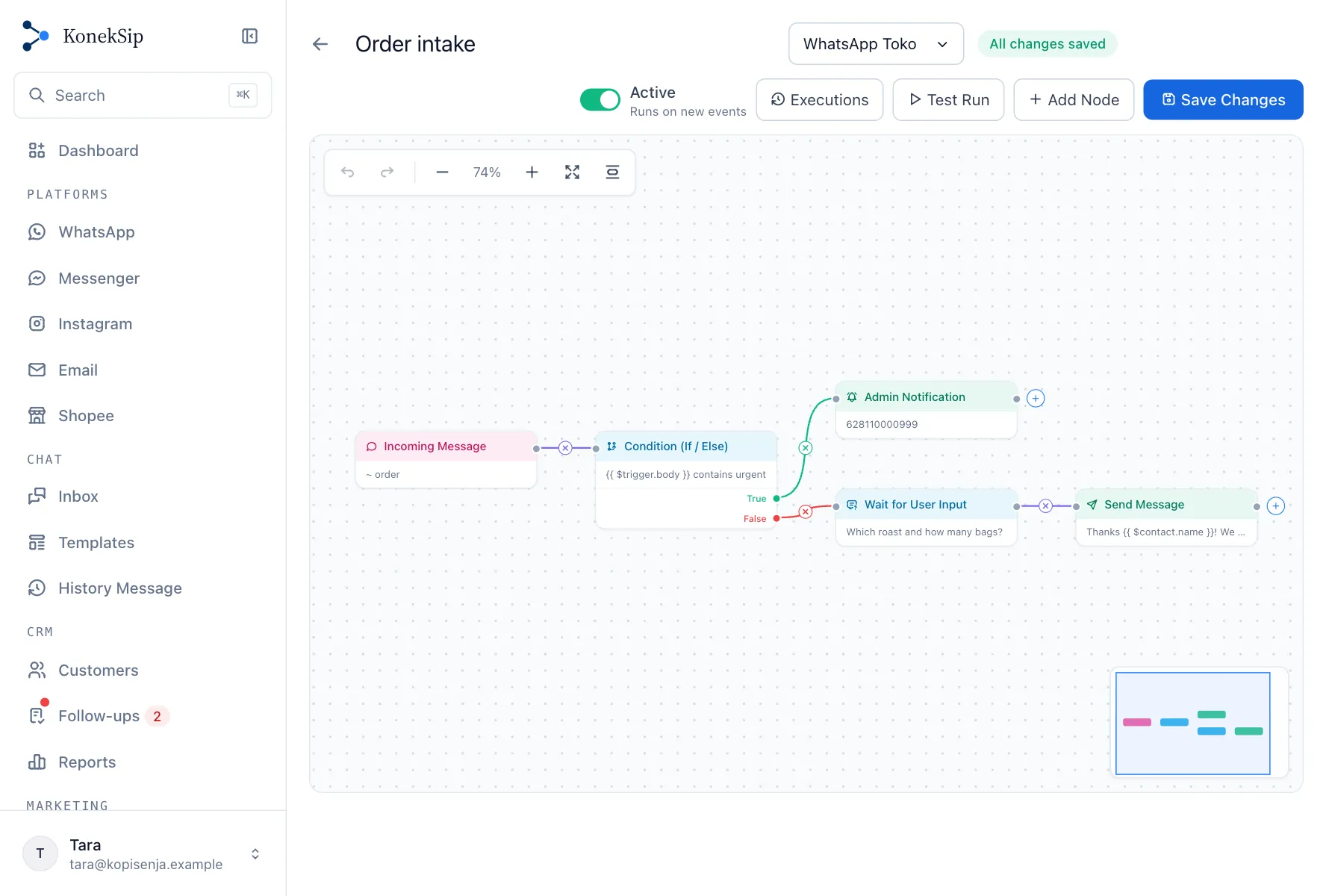
A workflow connects a trigger to a chain of steps. You draw it on a canvas, test it with a sample message and switch it on. After that it runs on its own, and your team keeps its time for the conversations that need a person.

What starts a workflow
- An incoming message. The message contains or equals a keyword you choose, or any message at all. By default a conversation that an agent already has is left alone.
- A schedule. A cron schedule in the time zone you pick, such as every weekday at 09:00.
- A webhook. Another system sends a request to a private address, and its data is available to the steps.
- A conversation assigned or closed. Follow up when a chat is handed to someone or resolved.
What a workflow can do
- Decide. A condition sends the flow one way or the other, comparing text or numbers.
- Wait. Pause for a few seconds up to seven days, or until the customer replies, and keep the answer in a variable for the next steps.
- Talk to the customer. Send a message, or reply with a quote of the original one.
- Keep your CRM tidy. Update the customer's name, email or company.
- Call other systems. Send an HTTP request to a public address and use the answer, and read or reshape JSON.
- Tell your team. Send an alert to a number of your own.
Values flow between steps. Write {{ $trigger.body }} or {{ $contact.name }} in a field, or pick a variable from a list that shows what the earlier steps provide.
A canvas made for people, not programmers
- Start from a template. A keyword reply, collecting a customer's details, a follow-up after closing, an alert from a webhook and a daily message are ready to adjust.
- Problems are shown before you switch on. A step with a missing field or no connection is marked in red, and a workflow with such a step cannot be activated.
- Undo and redo, zoom, a minimap and a tidy-up button keep larger flows manageable, and the main actions work from the keyboard.
Test before customers see it
Test Run walks the flow with a sample message and draws the result on the canvas. Nothing is sent, called or changed, so you can try a flow that is still being built.
See every run
The execution history lists each run step by step, with the time it took and the reason when a step failed. Filter by status, or let the page refresh by itself. Runs are kept for the history period of your plan.
Built with limits, so it stays safe
- A run stops after a fixed number of steps, so a loop cannot run forever, and one organization starts a limited number of runs a minute.
- The same contact cannot start the same workflow again within a cooldown you set.
- Messages that do not answer a customer, such as a scheduled message or one started by a webhook, are not sent to people who opted out of campaigns.
- A step that calls another system can only reach public addresses.
- Owners and admins build workflows. Agents keep working in the inbox.
Good to know
- A message that matches an incoming message trigger is handled by the workflow, so the keyword auto-replies and the AI do not answer it as well. You can choose to pass it on when the workflow sent no reply.
- Scheduled and webhook workflows send to a phone number, so they need a WhatsApp channel.
- Messages sent by a workflow are charged like any other message, including on numbers managed by KonekSip, where they are paid from the wallet.
Read about auto replies and the AI reply
More features
Try KonekSip free
14 days free, no credit card. Connect a channel and answer your first customer from the shared inbox.