

Feature
Auto Reply and AI Reply for Customer Chats
Answer common questions with keyword auto-replies and business hours, let an AI reply hand over when unsure, and summarize long chats with AI.
Answer the easy questions automatically
Many questions repeat: opening hours, prices, where to order. KonekSip answers them for you, and keeps your team for the conversations that need a person.
Keyword auto-replies
- Create a rule with a keyword and a reply. When an incoming message matches, the reply is sent.
- Replies can include pictures, video, audio or documents, not only text.
- Turn a rule on or off at any time, and set it per channel.
Business hours
Set your opening hours per day. Outside them, a customer who writes gets your message, once every 12 hours, so they know when to expect an answer and are not flooded with repeats.
AI reply, with a way out
- Nothing to set up with a provider. KonekSip runs the AI model, so you do not need an AI account or an API key. Turn it on for a channel and write your instructions.
- Your own instructions. Write a system prompt that tells the AI about your business and how to answer, and choose how many earlier messages it reads.
- Per channel. Turn the AI on only for the channels where you want it.
- Hand over to your team. When the AI is unsure, or the customer asks for a person, it stops. The conversation is marked pending, a message you wrote is sent, and the AI stays silent until your team has answered.
- Pay only for what it uses. Each reply is paid from your prepaid wallet by the tokens it uses, at a price per 1,000 tokens that is listed on the pricing page. The AI page shows the tokens used.
- Never over budget. When the wallet balance is too low the AI stays off, and the balance never goes below zero. The AI page tells you to top up.
Summarize a long conversation
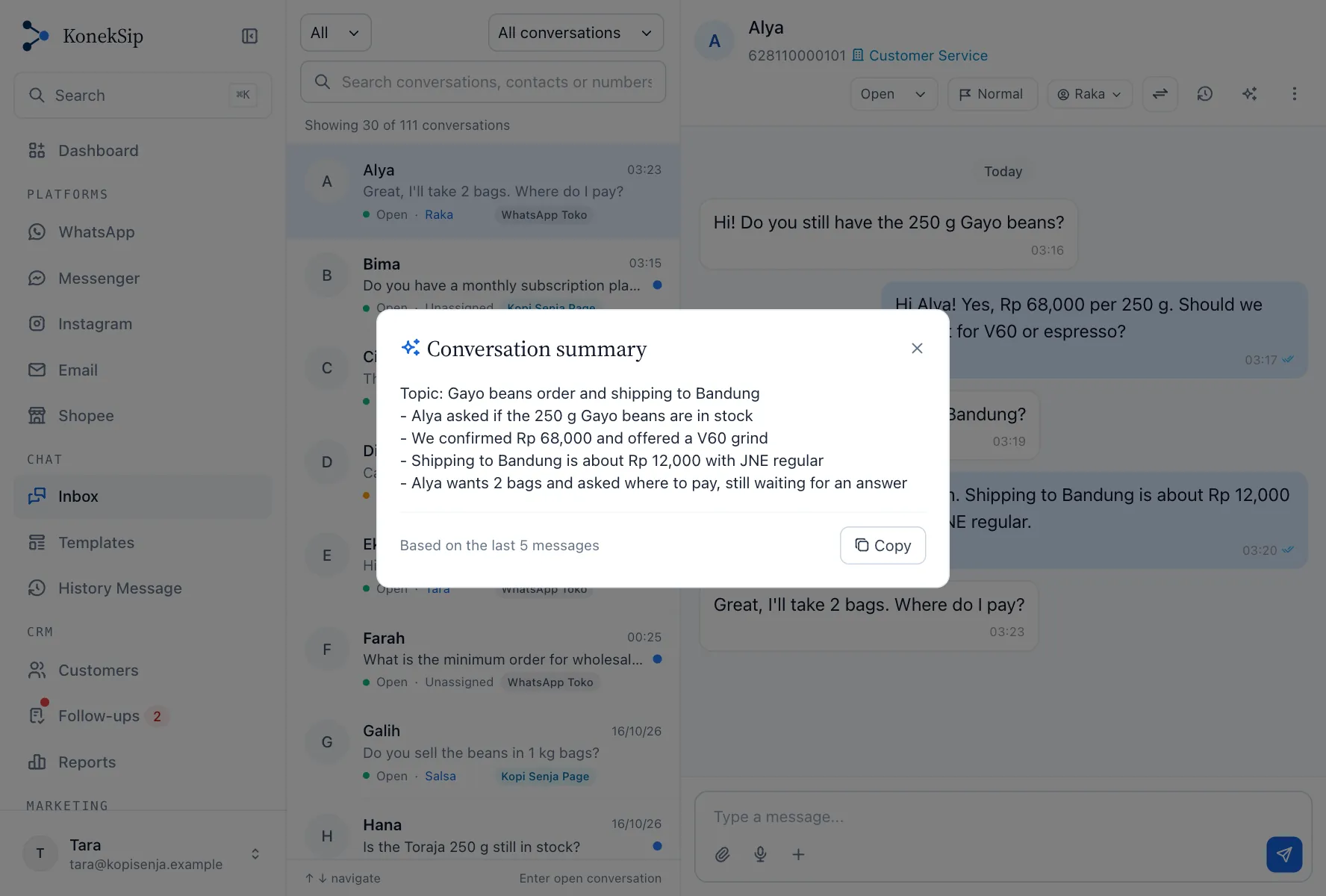

Open a conversation, press the sparkles button in its header and read a short summary: the topic in one line, then at most five bullet points with what the customer wants, what was answered and what is still open. It is written in the language of the conversation, and you can copy it into a note or a message to a colleague.
- Who can use it. Anyone who can see the conversation, on every channel.
- What it reads. The latest 100 text messages (comments and emails included), and the summary says how many it used.
- Only when you ask. Nothing is summarized in the background. A summary is paid from the same wallet as AI replies, and asking again for a conversation with no new message shows the same summary at no cost.
Counted as an answer
A reply from an auto responder or the AI counts as an answer for your response time (SLA), so a customer who got an instant answer is not flagged as waiting.
More features
Try KonekSip free
14 days free, no credit card. Connect a channel and answer your first customer from the shared inbox.