
Every customer chat in one inbox
Your whole team answers from the same place, and every customer ends up as one record. Campaigns, auto-replies and an API are included.
- Free for 14 days, no credit card
- Pay with QRIS, no auto-renewal


Who it is for
For teams that spend the day in chat
Customer service teams
Answer every customer chat in one place. Split the work between agents and keep each customer's full history.
Businesses with several brands or clients
Each brand or client gets its own organization, team, plan and limits. You switch between them with one login.
Developers
Send and receive messages through a REST API and webhooks. The reference is public, so you can read it before you sign up.
01 — Features
What you get
Answer as a team
Every channel lands in one inbox, so nobody has to ask who is handling what.
- Assign a chat to an agent or a department, let an agent claim it, or let new chats go to the agent with the fewest open ones
- Agents see their own chats and the unassigned ones in their department
- Set a priority on every chat, and a response time (SLA) that flags the chats that have waited too long
- Quote, react, star, pin, mute and archive, and edit or delete sent messages where the channel allows it
See who you are talking to
One customer, one record, whichever channel they write from.
- Notes, activity history and follow-up tasks with email reminders
- Segments and filters, import from xlsx or csv, and export
- Find duplicates and merge them
- Customers can opt out, and they are left out of campaigns
Send campaigns and see how they did
Send to a phonebook or a customer segment, at the time you choose.
- Set the start time and the delay between messages
- Personalize with the customer's name, number, email, company or any column from your spreadsheet
- Track sent, delivered, read, replied and failed for each campaign
- A customer who replies STOP is left out automatically
Let auto-replies go first
Keep replying outside working hours, and let AI answer or summarize for you if you want it.
- Keyword auto-replies that match part of a message or all of it
- Business hours with a time zone and an out-of-hours message
- AI replies with your own instructions and a hand-over to your team, no AI account or API key needed
- A one-click AI summary of a long conversation, in the language of the chat
- AI is paid by use from your prepaid wallet
Connect your own system
One REST API and webhooks for every channel that supports the action.
- REST API to send text, media, buttons, lists, templates (including one-time codes) and email, and to read conversations, messages and contacts. Idempotency keys make sure a retry never sends twice
- Webhooks for incoming messages, delivery status and conversation events (assigned, closed, response time exceeded), retried up to 5 times
- One API key per channel, an OpenAPI file for Postman and a full reference in the docs
Run several brands or clients
Each organization has its own team, plan and limits.
- Roles (owner, admin and agent) and departments
- A separate organization for each brand or client
- Usage against every limit, on the billing page
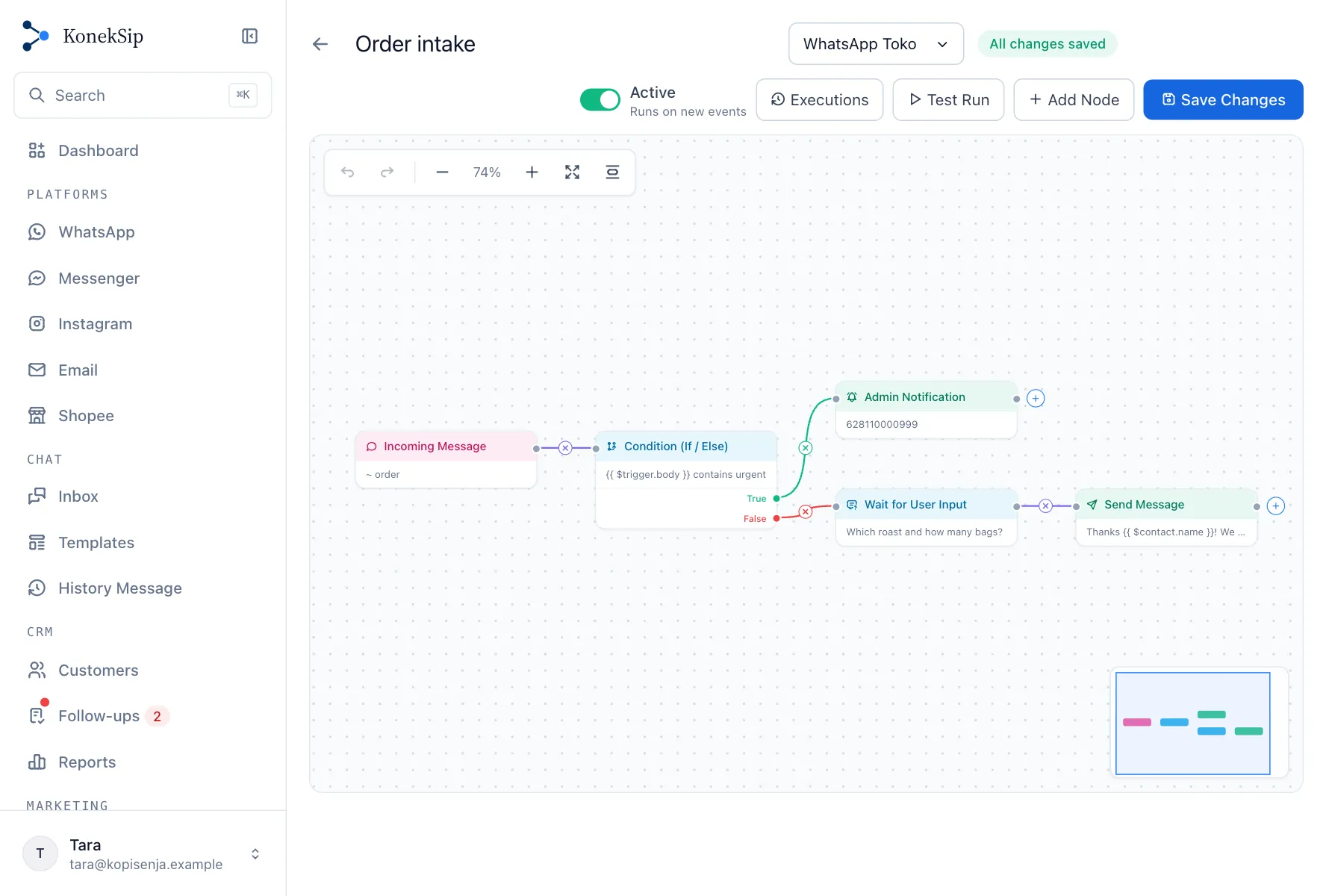
Automate the routine
Draw a workflow on a canvas and let it run by itself.
- Start from a keyword, a schedule, a webhook, or a conversation being assigned or closed
- Ask a question and keep the answer, wait up to seven days, decide with a condition, send messages and update the customer record
- Call another system over HTTP and use what it answers
- Test with a sample message before it goes live, then read every run step by step
See it in use
A quick look inside
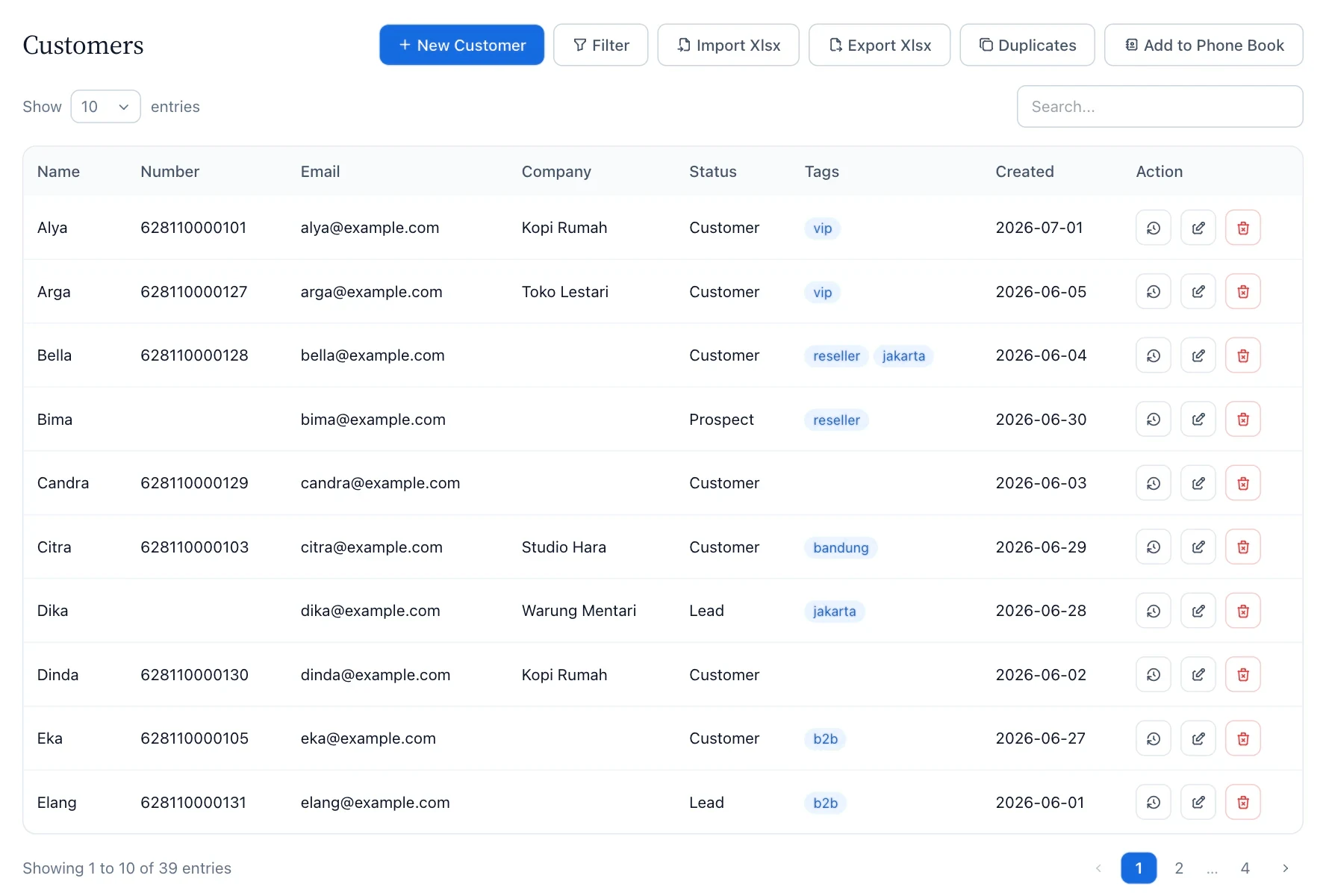
One record for every person you talk to
Notes, status, tags and follow-up tasks stay with the customer, whichever channel they write from. Import your list, filter it into segments and merge duplicates.

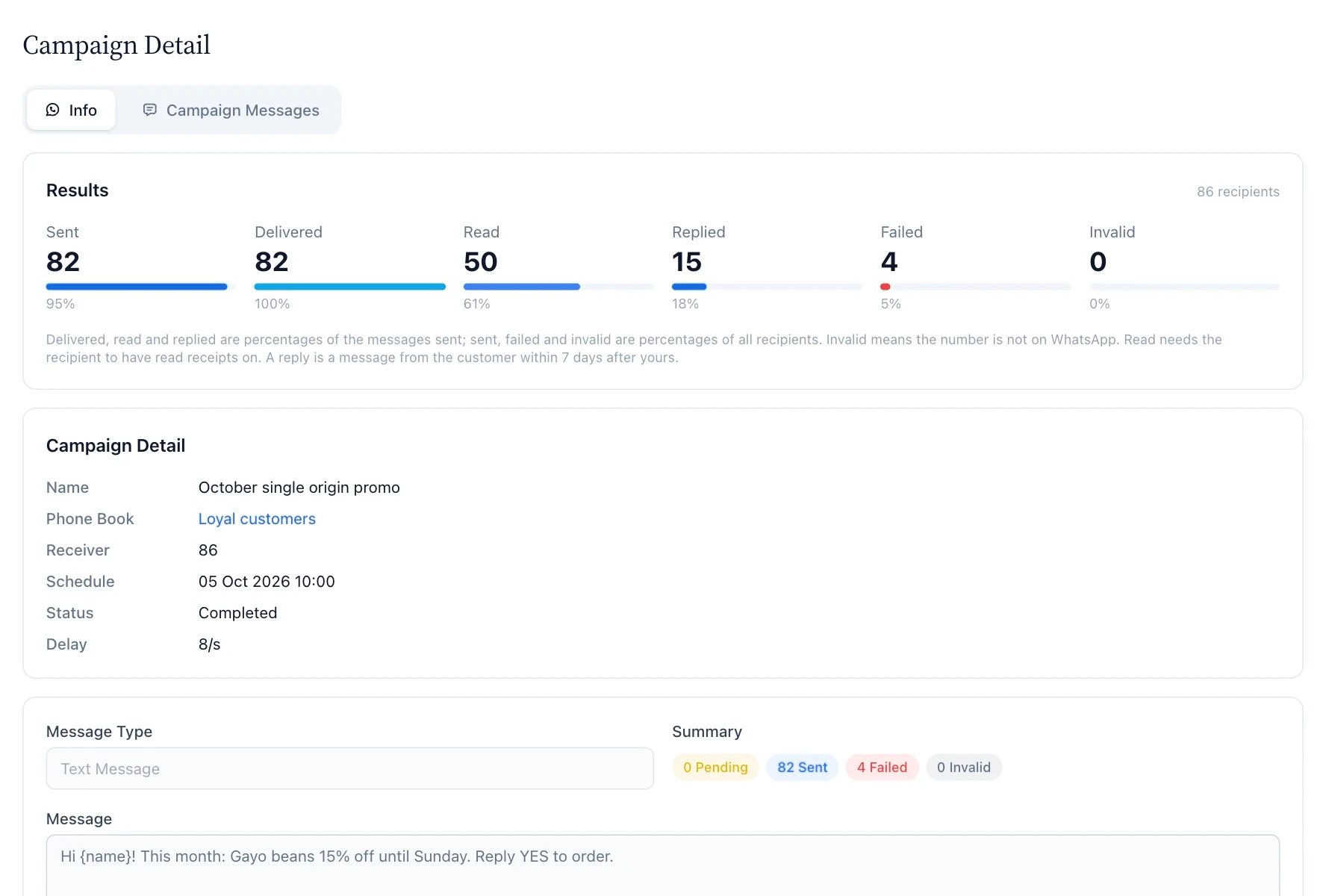
Campaigns you can read afterwards
Send to a phonebook or a segment and see what happened: sent, delivered, read, replied and failed. A reply counts when the customer writes back within 7 days.

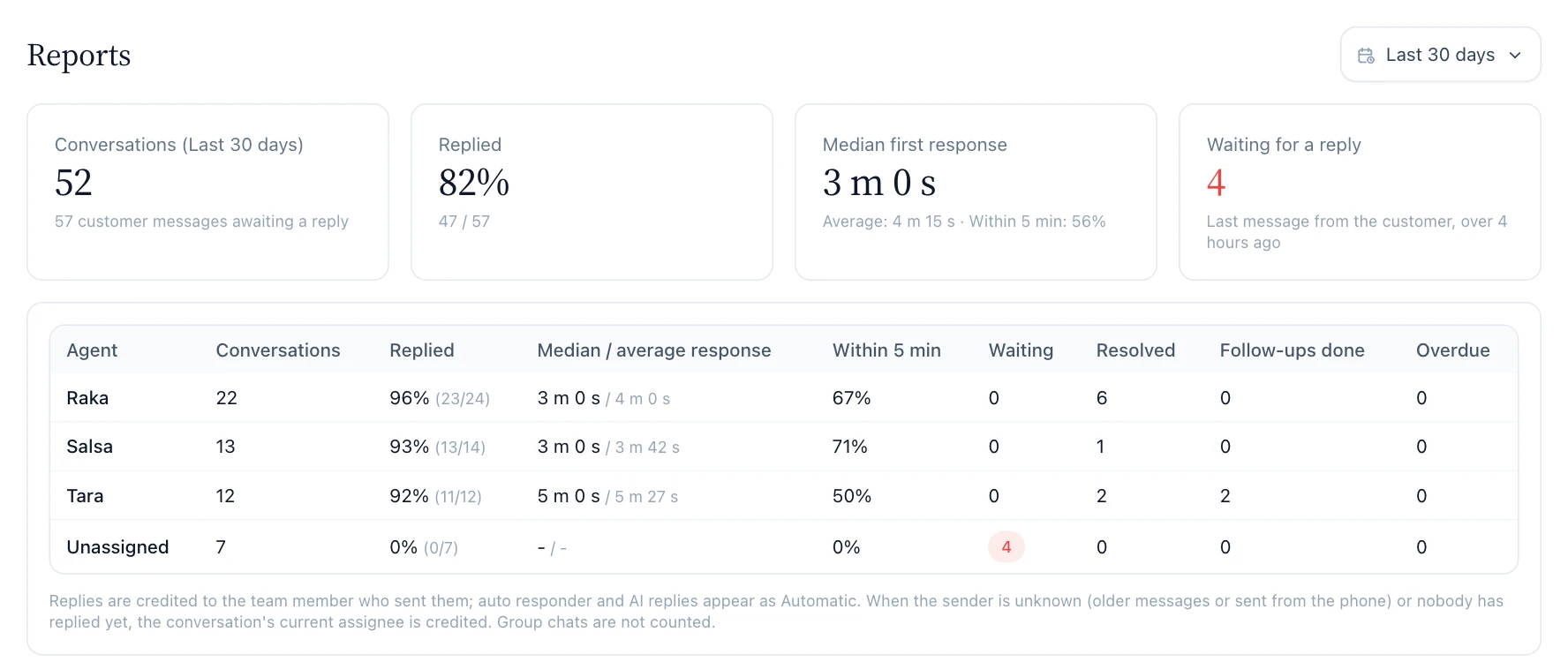
See how your team is doing
Replies, median first response time and the conversations still waiting for an answer, for each agent.

Automations you can see
Draw the steps of a routine task, test them with a sample message and switch them on. Every run is listed step by step, with the reason when something failed.

02 — Channels
Channels you can connect
Every channel feeds the same inbox and customer list. What each one can do differs, so here is the full picture.
Supports WhatsApp coexistence
Use the same number in the WhatsApp Business app and in KonekSip at once. Your recent chats and contacts are copied into the inbox one time, and messages you send from the app show up in the inbox too. Read the guide
| Channel | Connect with | You can | Good to know |
|---|---|---|---|
| WhatsApp, QR code | Scan a QR code with the WhatsApp appSetup guide | Text, media, buttons, polls, location, groups and campaigns | Runs on the WhatsApp Web protocol. Meta does not officially support it, and WhatsApp can restrict numbers it flags as abusive. |
| WhatsApp, official Cloud API | Log in with Facebook, optionally together with the WhatsApp Business app (coexistence)Setup guide | Text, media, buttons, lists, approved message templates (one-time code templates through the API) and campaigns made of templates | Free-form messages only within Meta's 24-hour window. Campaigns send approved templates, which can open a conversation outside that window. |
| Facebook Messenger | Log in with FacebookSetup guide | Text and media, with replies and auto-replies | Customers can be answered for 24 hours after their last message. Campaigns are not available. |
| Log in with Facebook, for a professional account linked to a PageSetup guide | Text and media, with replies and auto-replies | Same 24-hour window as Messenger. Campaigns are not available. | |
| SMTP to send, IMAP to receiveSetup guide | Send and receive email, with attachments | HTML emails open in a sandbox with remote images off. Without IMAP the channel can only send. | |
| Shopee | Your own Shopee Open Platform app, then authorize the shopSetup guide | Text replies to buyer chats, with auto-replies | Buyers' images and other attachments show as a link. Campaigns are not available. |
| Live chat | Paste one line of code on your websiteSetup guide | Text chat with visitors, with auto-replies and an optional name and email form | Text only. A visitor who has left sees the reply when the chat opens again. Campaigns are not available. |
03 — How it works
From a message to a customer
-
01
A message arrives
From any connected channel, it shows up in the inbox marked with its channel.
-
02
Auto-replies go first
Business hours, keyword auto-replies and AI replies can respond before a person does.
-
03
A person takes over
The chat goes to an agent or a department, automatically or by claim, and a response time (SLA) flags the chats that wait too long.
-
04
You keep the history
Attach notes, set a follow-up task and add the customer to a segment for the next campaign.
04 — Developers
Plug it into your own system
Send messages with one request, read conversations and receive replies on your server. The same API serves every channel that supports the action.
POST https://koneksip.com/api/messages
curl -X POST https://koneksip.com/api/messages \
  -H "Content-Type: application/json" \
  -H "Authorization: Bearer YOUR_API_KEY" \
  -H "Idempotency-Key: 7c9e6679-7425-40de" \
  -d '{
    "type": "text",
    "receiver": "628123456789",
    "message": "Hello from KonekSip!"
  }'

200 {"message": "Message sent.", "data": {"message_id": "3EB0C767D0B1A2F4E5"}}
Webhook to your server
{
  "id": "evt_5b9f6a0e-3c1d-4c0e-9a77-1f2a8d4e6b10",
  "type": "message.received",
  "created_at": 1735689601,
  "channel_id": "uuid-of-the-channel",
  "data": {
    "message_id": "3EB0...",
    "timestamp": 1735689600,
    "from": "628123456789",
    "participant": null,
    "is_group": false,
    "is_me": false,
    "message": "Hello! I need information about your products.",
    "media": null,
    "button_reply": null
  }
}
05 — Pricing
Plans and limits
Start with a 14-day free trial. Change plans anytime. See the Lite plans.
| Plan | Free trial Free 14 days | Starter Most Popular Rp 799.000 /month | Pro Rp 1.850.000 /month | Business Rp 3.300.000 /month | Custom Custom |
|---|---|---|---|---|---|
| Channels | 1 | 1 | 6 | 15 | Custom |
| Members | 3 | 3 | 10 | 30 | Custom |
| Broadcasts / month | 0 | 2.000 | 10.000 | 50.000 | Custom |
| Messages / month | 2.000 | 50.000 | 200.000 | 1.000.000 | Custom |
| History | 30 days | 90 days | 365 days | 365 days | Custom |
| Storage | 100 MB | 500 MB | 2 GB | 10 GB | Custom |
| Plan | Start free trial | Start free trial | Start free trial | Start free trial | Contact us |
- How limits work
- Limits apply per organization. Monthly counters reset on the first of each month, Asia/Jakarta time.
- When you reach a limit
- That action pauses until next month or an upgrade. Your data is never deleted because of a limit.
- How you pay
- QRIS. A plan is prepaid for a month or a year and does not renew by itself. The prepaid wallet for AI and managed WhatsApp numbers is topped up by QRIS too.
- Changing plans
- Upgrading credits the unused days of your current plan. Downgrading shows what would exceed the new limits first.
06 — Data and privacy
How your data is handled
Organizations are kept apart
One organization's conversations, customers and files are never visible to another.
Access by role
Owners, admins and agents only see what their role allows.
Old data deletes itself
Messages and media older than your plan's history period are deleted automatically.
Delete everything when you leave
An owner can delete the organization and permanently remove its data.
Payments
We do not store your payment credentials.
Your data stays yours
Your organization decides how its customers' data is used. We only process it on your behalf.
The details are in our Privacy Policy and Terms of Service.
07 — FAQ
Questions people ask
What is KonekSip?
KonekSip is a shared inbox and CRM. Messages from your channels arrive in one inbox that your whole team answers together, and every customer gets one record with notes, tags and follow-up tasks. It also sends WhatsApp campaigns, runs auto-replies and AI replies, summarizes long conversations, tracks how fast your team replies and has a REST API with webhooks.
How much does KonekSip cost?
Every new account gets 14 days free, no credit card. Paid plans start at Rp 799.000 a month, and the pricing table above lists every plan with its limits. You pay by QRIS, and a plan does not renew by itself.
Can several agents use the same WhatsApp number?
Yes. Connect the number once as a channel and every agent answers from the shared inbox. Chats can be assigned to an agent or a department, and each agent sees their own chats and the unassigned ones in their department.
Is there a free trial?
Yes. Every new account gets 14 days free, no credit card. The trial limits are lower than the paid plans, and you pick a plan when you are ready.
Which channels can I connect?
The chat apps, social messaging, marketplaces and email your customers already use. The table above lists the current channels and how each one connects. They all share one inbox and one customer list. Campaigns are available for WhatsApp only.
What is the difference between a QR connection and the official WhatsApp API?
A QR connection links your existing WhatsApp number in minutes, but it runs on the WhatsApp Web protocol, which Meta does not officially support. The official Cloud API is backed by Meta and uses approved message templates outside the 24-hour window. You choose per channel.
Does KonekSip support WhatsApp coexistence, so I can keep using the WhatsApp Business app on the same number?
Yes, on an official connection. Log in with Facebook and tick that the number is also used in the WhatsApp Business app. The number then works in both, and your recent chats and contacts are copied into the inbox once. Groups, calls and a few other app features are not available on a number used this way.
What happens when I reach a limit?
Sending pauses until next month or until you upgrade. Your data and conversations stay where they are, and you can check your usage on the billing page any time.
Can I change my plan later?
Yes. If you upgrade, the unused days of your current plan are credited. If you downgrade, we show what would go over the new limits before you confirm.
How do I pay?
By QRIS. Pick a plan, scan the QR code, and the plan is active as soon as the payment is confirmed. If you use AI or a number managed by KonekSip, you also top up a prepaid wallet by QRIS, and every top-up has a history and a PDF receipt.
Do I pay WhatsApp message fees on top of my plan?
It depends on how the official WhatsApp number is connected. If you connect your own Meta account, Meta bills you directly and nothing is charged in KonekSip. On a number managed by KonekSip you pay per delivered message from a prepaid wallet that you top up by QRIS, and replies to a customer within 24 hours are free for the first 1,000 messages a month. The price per message, before 11% VAT, is listed in the WhatsApp guide.
Does KonekSip have AI, and what does it cost?
Yes. An AI reply can answer customers on the channels you choose, with your own instructions and a hand-over to your team when it is unsure, and one click summarizes a long conversation. You do not need an AI account or an API key. AI is paid by use from the same prepaid wallet you top up by QRIS, at a price per 1,000 tokens that is listed on the pricing page. When the balance is too low, AI stays off, and the balance never goes below zero.
Can I send one-time codes (OTP) on WhatsApp?
Yes, on an official WhatsApp number. Create an authentication template, which WhatsApp words for you and gives a Copy code button, then send it through the REST API with the code. The code is not kept in your message history or shown in the inbox. Authentication messages are priced as their own category.
Who owns the conversation data?
You do. Your organization owns its conversations and customers, and KonekSip only processes them on your behalf. The Privacy Policy has the details.
Can I connect my own system?
Yes. Send messages through the REST API, read conversations, messages and contacts, and receive incoming messages, delivery status and conversation events on your server through webhooks. An OpenAPI file is available for Postman or Insomnia, and the API documentation has the details.
Can I see how fast my team replies?
Yes. Set how long a customer may wait for each priority (SLA), and chats that wait longer are flagged in the inbox. The Reports page shows the median first response time per agent, and your webhook can receive an event when a chat waits too long.
Can I personalize a campaign with my own data?
Yes. Import your customers from an xlsx or csv file, and every extra column becomes a field you can use in the message, for example {order_id}. A customer who replies STOP is left out of every campaign from then on.
Is KonekSip available in Indonesian?
Yes. The app, the documentation and this site are available in Indonesian and English, and you can switch language at any time.